 By
·
8 minute read
By
·
8 minute read
Introduction: Why Your Site's Foundation Matters
You've done impeccable keyword research. You've optimized every on-page element perfectly. But if your website's foundation is broken, none of it matters. Technical SEO is the plumbing behind your site—invisible to most visitors, but critical to how search engines crawl, index, and rank your pages.
Technical SEO encompasses the infrastructure and backend optimizations that help search engines efficiently discover, crawl, and understand your website. It includes site speed, mobile-friendliness, crawlability, indexation, security, and structured data—none of which require coding knowledge to understand or improve, despite the intimidating name.
The good news: you don't need to be a developer to understand and implement technical SEO. Many technical improvements can be made through plugins, hosting upgrades, or simple configuration changes. This guide walks non-technical marketers through the essential technical SEO concepts that impact rankings and user experience.
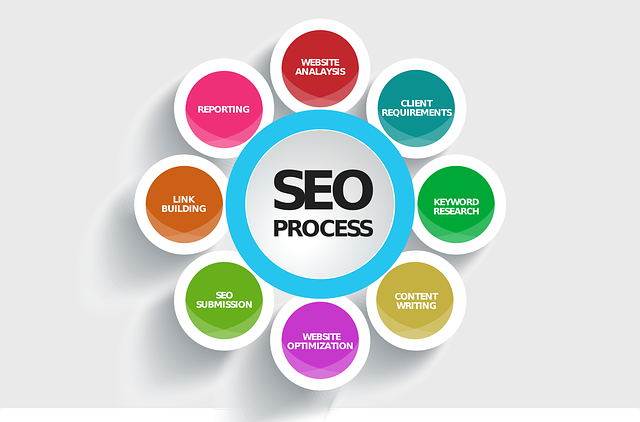
This article is designed to work alongside "Keyword Research That Actually Converts," "On-Page SEO Checklist for Modern Websites," "SEO Mistakes That Kill Organic Growth," and "Measuring SEO Success Beyond Rankings." Together, these five guides create a complete SEO strategy where keyword research → on-page optimization → technical foundation → avoiding mistakes → measurement all work together.
What Is Technical SEO? (And Why It's Not As Scary As It Sounds)
Technical SEO is the foundation that allows your keyword research and on-page optimization to actually work. Without proper technical SEO:
-
Google can't find all your pages (crawlability issues)
-
Google can't index your content (indexation problems)
-
Your pages load slowly, hurting both user experience and rankings (performance issues)
-
Your site doesn't work on mobile, which is where most searches happen (mobile optimization)
-
Your site gets hacked or loses visitor trust (security issues)
The five core pillars of technical SEO are:
1. Site Speed and Performance
Page speed is a ranking factor. More importantly, slow pages drive users away before they even see your content.
What to optimize:
-
Image file sizes (compress without losing quality)
-
Minify CSS and JavaScript
-
Enable browser caching
-
Use a Content Delivery Network (CDN)
-
Upgrade hosting if your server is slow
-
Remove render-blocking resources
Tools to check speed:
-
Google PageSpeed Insights (free, shows issues)
-
GTmetrix (free, visual waterfall analysis)
-
WebPageTest (free, detailed performance data)
Target: Pages should load in under 3 seconds. Core Web Vitals (LCP, FID, CLS) should all be in the "Good" range.
2. Mobile-First Optimization

Over 60% of searches happen on mobile devices. Google now primarily indexes the mobile version of your site for ranking and indexing.
What to check:
-
Is your design responsive (works on all screen sizes)?
-
Are buttons/links large enough to tap?
-
Is text readable without zooming?
-
Do forms work smoothly on mobile?
-
Are images optimized for mobile screens?
Test your site on mobile using Google Mobile-Friendly Test (free tool).
3. Crawlability and Indexation
Google uses bots called "crawlers" to discover and read your pages. If crawlers can't access your pages, they can't be indexed or ranked.
Common crawlability issues:
-
Robots.txt blocking important pages
-
Noindex tags preventing indexation
-
Broken links creating crawl errors
-
Redirect chains wasting crawl budget
-
Pages requiring login to view
Check Google Search Console to see:
-
Coverage (which pages are indexed)
-
Crawl errors (pages Google can't access)
-
Sitemap status
4. Site Security (HTTPS)
HTTPS (the "S" stands for Secure) encrypts data between your visitor's browser and your server. Google explicitly uses HTTPS as a ranking factor.
What you need:
-
An SSL certificate (most hosting providers offer these free with cPanel)
-
Redirect all HTTP traffic to HTTPS
-
Ensure all resources (images, scripts) load via HTTPS, not mixed content
This is non-negotiable. Migrate to HTTPS immediately if you haven't already.
5. Core Web Vitals
Google's Core Web Vitals measure user experience:
-
LCP (Largest Contentful Paint): Time until main content loads (target: under 2.5 seconds)
-
FID (First Input Delay): Response time to user interaction (target: under 100ms)
-
CLS (Cumulative Layout Shift): Visual stability as page loads (target: under 0.1)
Check these in PageSpeed Insights or Google Search Console.
XML Sitemaps: Help Google Find Every Page

An XML sitemap is a file listing every important page on your site, told directly to Google. It's like a map for search engines.
Why you need one:
-
Ensures Google discovers all pages, even orphaned ones
-
Tells Google how frequently you update pages
-
Indicates which pages are most important
-
Helps crawlers understand site structure
How to create one:
-
Most CMS platforms (WordPress, Shopify, Wix) generate sitemaps automatically
-
Use tools like XML-Sitemaps.com to generate one for static sites
-
Submit it to Google Search Console
Your sitemap should be at domain.com/sitemap.xml and should list all important pages. Don't include duplicate content or pages you want hidden.
Robots.txt: Guide Crawlers Through Your Site
Robots.txt is a file in your site's root directory that tells search engines which pages to crawl and which to skip.
Common uses:
-
Block low-value pages (admin pages, duplicate content, private areas)
-
Direct crawlers to your sitemap
-
Prevent crawling of resource-heavy pages
Important: Don't use robots.txt to prevent indexation—use noindex tags instead. Robots.txt only controls crawling, not indexation.
Example robots.txt:
User-agent: *
Allow: /
Sitemap: https://domain.com/sitemap.xml
Disallow: /admin/
Disallow: /private/
Disallow: /*?version=
Structured Data and Schema Markup: Help Google Understand Your Content
Structured data (schema markup) is code that tells Google exactly what your content is about—not just "this is an article," but "this is a recipe for chocolate cake with 4.5 stars and takes 30 minutes."
Why it matters:
-
Enables rich results (star ratings, prices, recipes, FAQs appear in search results)
-
Increases real estate in search results
-
Can significantly improve CTR
-
Helps voice search understand your content
Common schema types:
-
Article (blog posts)
-
Product (e-commerce)
-
Recipe (cooking content)
-
FAQ (question/answer pages)
-
Event (upcoming events)
-
LocalBusiness (local businesses)
How to implement:
-
Use plugins (Yoast SEO, Rank Math for WordPress)
-
Use Google's Structured Data Markup Helper (free tool)
-
Add JSON-LD directly to your site
Canonical Tags: Solve Duplicate Content Issues
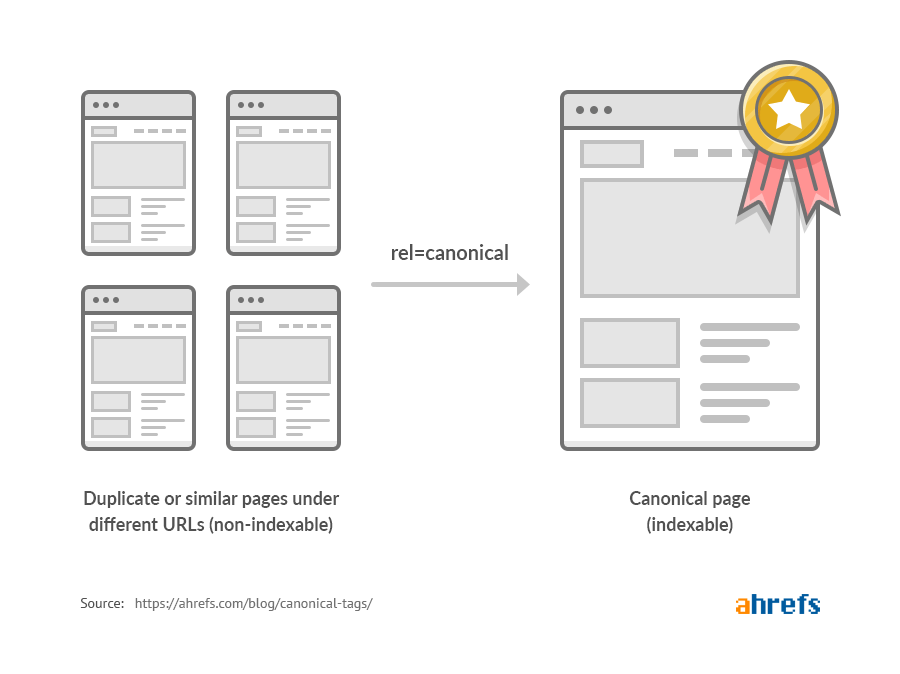
Duplicate content confuses search engines about which version to rank. Canonical tags tell Google: "This page is the main version; the others are duplicates."
When to use canonical tags:
-
Product pages with multiple variations (color, size)
-
Blog posts accessible via multiple URLs
-
Mobile and desktop versions of the same page
-
Content syndicated on multiple sites
How to use them:
Add this to the <head> of your page:
<link rel="canonical" href="https://domain.com/primary-version/" />
Important: Self-reference canonical tags (page pointing to itself) are best practice even when no duplicate exists.
Redirects: Handle URL Changes Properly
When you delete or change a URL, a redirect tells Google (and users) where the page moved.
Types of redirects:
-
301 (Permanent): Use this when a page has permanently moved
-
302 (Temporary): Use when a page temporarily moved or is under maintenance
-
Meta refresh: Avoid these (slower, less reliable)
-
JavaScript redirects: Avoid these (Google may not follow them)
Good practice:
-
Use 301 redirects when consolidating pages
-
Don't create redirect chains (A→B→C→D); each adds latency
-
Avoid redirects whenever possible; 301s pass most link equity but lose some
Crawl Budget: Maximize Google's Attention
Google has a limited "crawl budget"—the number of pages it will crawl per day on your site. Wasting crawl budget on low-value pages means important pages get crawled less frequently.
How to optimize crawl budget:
-
Fix crawl errors (Google wastes time on broken pages)
-
Remove low-value pages from the crawlable site (use noindex or robots.txt)
-
Eliminate redirect chains (each redirect uses budget)
-
Remove duplicate content (consolidate using canonical tags)
-
Submit your sitemap (helps Google prioritize important pages)
-
Improve site speed (Google can crawl more pages in same time)
Check crawl stats in Google Search Console to see how much budget you're wasting.
Indexation: Make Sure Your Pages Are Actually Indexed

Being crawled and being indexed are different. Google crawls millions of pages but only indexes a fraction.
Common indexation issues:
-
Noindex tags blocking pages you want ranked
-
Robots.txt blocking pages from crawling
-
Duplicate content competing for ranking
-
Thin content (very short pages) not meeting indexation threshold
-
Poor quality signals
Check your indexation:
-
Search "site:domain.com" in Google to see roughly how many pages are indexed
-
Use Google Search Console Coverage report for exact indexation data
-
Look for "Excluded" pages to understand why pages aren't indexed
If pages you want indexed aren't showing up, use Google Search Console's "Request Indexing" tool to ask Google to recrawl them.
Mobile-First Indexing: Get This Right
Google now primarily indexes and ranks the mobile version of your site. If your mobile version is missing content, slow, or broken, your rankings suffer.
What to check:
-
Is critical content (text, images) present on mobile?
-
Are important internal links accessible on mobile?
-
Does mobile site have same functionality as desktop?
-
Are CTAs visible and clickable on mobile?
-
Load time acceptable on 4G connections?
Test your mobile experience using:
-
Google Mobile-Friendly Test
-
DevTools in your browser (F12, toggle device toolbar)
-
Actual mobile devices
Connecting Technical SEO to Your Complete Strategy
Technical SEO doesn't work in isolation. It's the foundation that supports:
-
Keyword Research (Blog 1): Keywords only matter if your site can be crawled and indexed
-
On-Page SEO (Blog 2): Page optimizations fail on slow or mobile-unfriendly sites
-
SEO Mistakes to Avoid (Blog 4): Many ranking killers are technical issues
-
Measuring Success (Blog 5): Technical metrics like Core Web Vitals impact rankings and conversions
A slow site with perfect on-page SEO will still rank poorly. A fast, mobile-friendly site with poor on-page SEO will also rank poorly. All three must work together.
Quick Takeaways
-
Technical SEO is the foundation that allows keyword research and on-page optimization to work—ignore it and your efforts fail.
-
Site speed is critical: Pages should load under 3 seconds; Core Web Vitals should be in "Good" range.
-
Mobile-first optimization is non-negotiable: Over 60% of searches are mobile; Google primarily indexes mobile versions.
-
Crawlability and indexation: Ensure Google can find and index all important pages; use Search Console to monitor.
-
HTTPS/SSL is mandatory: It's a ranking factor and a trust signal; migrate immediately if not already using.
-
XML sitemaps help Google: Submit your sitemap to Search Console; let Google know your site structure.
-
Robots.txt guides crawlers but doesn't prevent indexation; use it to block low-value pages.
-
Canonical tags solve duplicate content issues; use them even on unique pages as self-referencing best practice.
-
Schema markup enables rich results: Implement at least Article or FAQ schema; rich results improve CTR significantly.
-
Redirects should be 301 (permanent); avoid redirect chains and unnecessary redirects.
-
Monitor crawl budget: Fix errors, remove low-value pages, optimize speed to maximize Google's attention.
-
Indexation requires crawlability plus good signals; check Search Console to see which pages are indexed and why others aren't.
Conclusion
Technical SEO is unglamorous—no one gets excited about Core Web Vitals the way they do about ranking for a popular keyword. But technical issues are ranking killers. A site with perfect on-page SEO but poor technical health will always lose to a site with good technical SEO and decent on-page optimization.
The good news: technical SEO improvements compound. Once you fix your site's speed, mobile experience, security, and crawlability, those benefits persist indefinitely. You're not constantly battling technical issues if you've laid a proper foundation.
Start by running your site through Google PageSpeed Insights and Google Mobile-Friendly Test. These free tools will immediately tell you your biggest technical problems. Then tackle them in order of impact: speed improvements, mobile optimization, indexation issues, security, and structured data.
When combined with strong keyword research (Blog 1), optimized on-page elements (Blog 2), awareness of mistakes to avoid (Blog 4), and proper measurement strategies (Blog 5), technical SEO becomes the silent force that makes everything else work.
Your next step: Run Google PageSpeed Insights on your homepage. Note the top 3 issues. Tackle the easiest one first. You'll likely see immediate impact on your site's performance and user experience, which will eventually translate to better rankings.
Frequently Asked Questions About Technical SEO
Q1: Do I need to hire a developer to implement technical SEO?
A: Not necessarily. Many technical improvements can be made through plugins (WordPress), hosting upgrades, or configuration changes. Only advanced issues like server-side rendering or AMP implementation typically require developer help.
Q2: How long does it take to see results from technical SEO improvements?
A: Speed improvements and mobile optimization show immediate user experience benefits. Ranking improvements from technical fixes typically appear in 2–4 weeks as Google recrawls and re-indexes your pages.
Q3: What's the difference between crawling and indexing?
A: Crawling is when Google's bots read your page. Indexing is when Google adds it to its index (database of pages). A page can be crawled but not indexed (if it has a noindex tag). It cannot be indexed without being crawled.
Q4: Should I use AMP (Accelerated Mobile Pages)?
A: AMP is no longer required for mobile-first rankings. Modern mobile web (Core Web Vitals optimization) is sufficient. Only use AMP if you specifically need its features.
Q5: How often should I check my technical SEO health?
A: Monitor Google Search Console weekly for crawl errors and indexation issues. Run PageSpeed Insights and Mobile-Friendly Test monthly. Do a comprehensive technical audit quarterly.
Q6: Can I fix technical SEO issues myself, or should I hire an agency?
A: Most basic issues (speed optimization, mobile testing, security) can be fixed yourself with free tools. Complex issues or sites with thousands of pages may benefit from agency help for efficiency.
Keep Reading: Complete Your SEO Strategy
This technical foundation guide pairs with:
-
"Keyword Research That Actually Converts" – Know what keywords to target
-
"On-Page SEO Checklist for Modern Websites" – Optimize each page for those keywords
-
"SEO Mistakes That Kill Organic Growth" – Avoid costly errors
-
"Measuring SEO Success Beyond Rankings" – Track what actually works
References
Google Search Central. (2025). Core Web Vitals Report. Retrieved from https://search.google.com/search-console
Google Developers. (2025). PageSpeed Insights. Retrieved from https://pagespeed.web.dev/
Backlinko. (2025). Technical SEO Guide. Retrieved from https://backlinko.com/technical-seo-guide
Semrush. (2025). Technical SEO Checklist. Retrieved from https://www.semrush.com/blog/technical-seo/
Moz. (2025). Technical SEO. Retrieved from https://moz.com/learn/seo/technical-seo
Search Engine Journal. (2025). Advanced Technical SEO Guide. Retrieved from https://www.searchenginejournal.com/technical-seo/
Screaming Frog. (2025). Technical SEO Best Practices. Retrieved from https://www.screamingfrog.co.uk/
Google Webmaster Blog. (2025). Mobile-First Indexing. Retrieved from https://developers.google.com/search/mobile-sites/mobile-first-indexing