
 By
·
13 minute read
By
·
13 minute read
Introduction: Why On-Page SEO Still Matters (More Than Ever)
You've done your keyword research. You've identified exactly which search terms will bring your ideal customers to your door. Now comes the critical next step: making sure your pages are actually optimized to rank for those keywords and convert the visitors who arrive. That's where on-page SEO comes in.
On-page SEO refers to all the optimizations you make directly on your website—title tags, meta descriptions, headers, content, images, URLs, internal links, and more—to signal to search engines and users that your page deserves to rank for specific keywords and provides genuine value. It's the bridge between your keyword research strategy and actual rankings.
Unlike off-page factors like backlinks (which you can influence but don't fully control), on-page elements are entirely within your control. This makes on-page SEO one of the highest-ROI areas to optimize. A single improvement—like writing a more compelling title tag—can boost your click-through rate by 20% or more without changing your ranking position.
This article provides a comprehensive, actionable checklist for optimizing every on-page element that impacts rankings and conversions. It's designed to work alongside your keyword research strategy (covered in our previous article "Keyword Research That Actually Converts") and to interlink with four other essential SEO guides: "Technical SEO Basics for Non-Developers," "SEO Mistakes That Kill Organic Growth," "Measuring SEO Success Beyond Rankings," and foundational keyword research principles that inform every optimization decision.
The Foundation: Understanding How On-Page SEO Works
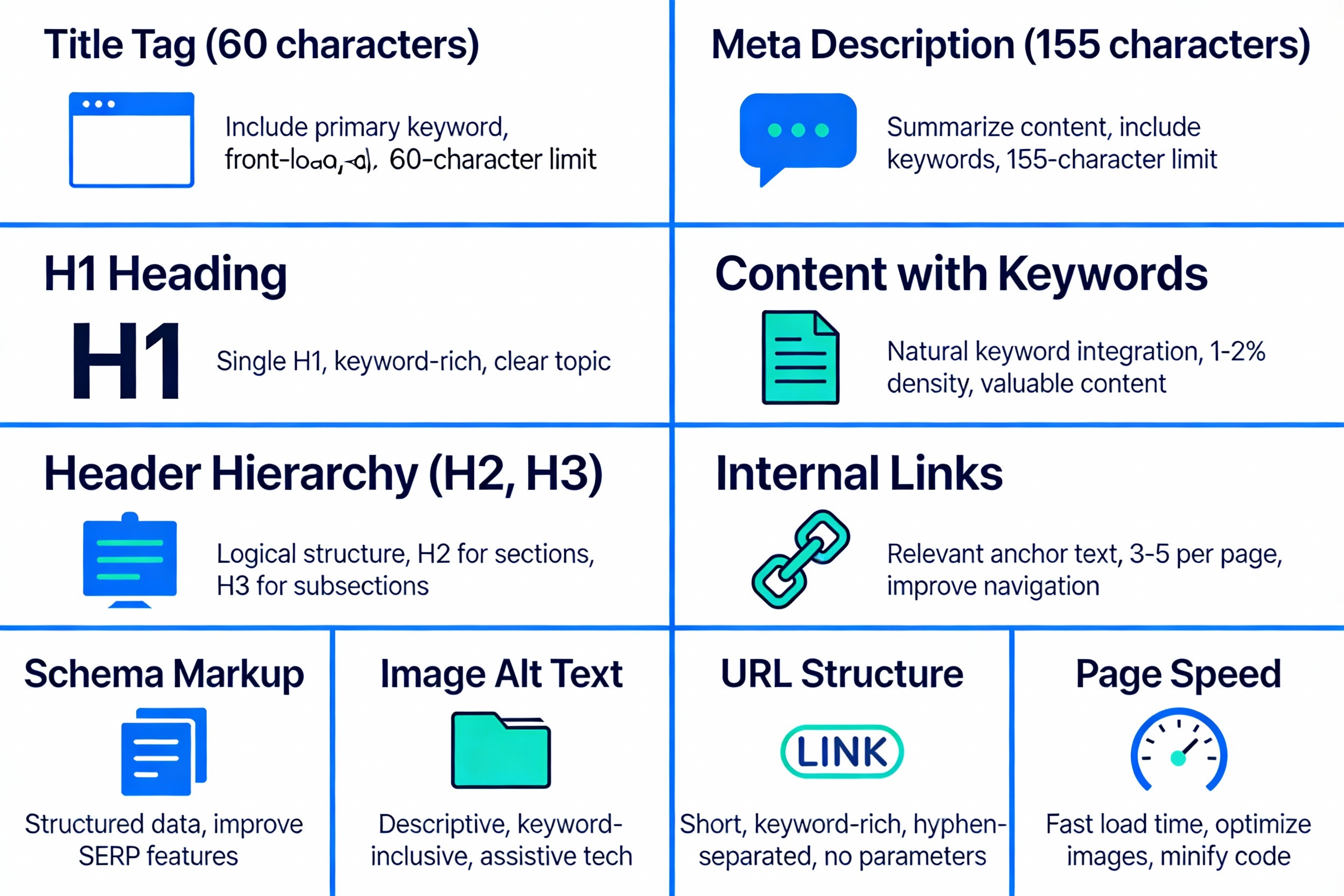
On-page SEO works by making three things crystal clear to Google and other search engines:
-
Relevance – Your page is genuinely about the keywords and topics the user searched for.
-
Authority – Your page provides authoritative, trustworthy information on the topic.
-
User Experience – The page is easy to read, fast to load, works on mobile, and encourages engagement.
When you optimize on-page elements strategically, you're not "tricking" Google—you're helping Google understand what your page is about and confirming that it's a good match for specific search queries. The better you make this case, the more likely you are to rank and the higher your click-through rate when you do rank.
Title Tags: Your Most Important On-Page Element
Every page on your website should have a unique, descriptive title tag between 50–60 characters. Titles longer than 60 characters get truncated in search results, cutting off critical information. Titles shorter than 30 characters often appear incomplete and may hurt CTR.
Your title should include your primary keyword, ideally near the beginning, but read naturally for humans—not search engines. Google will override obviously spammy titles, so write for users first and SEO second.
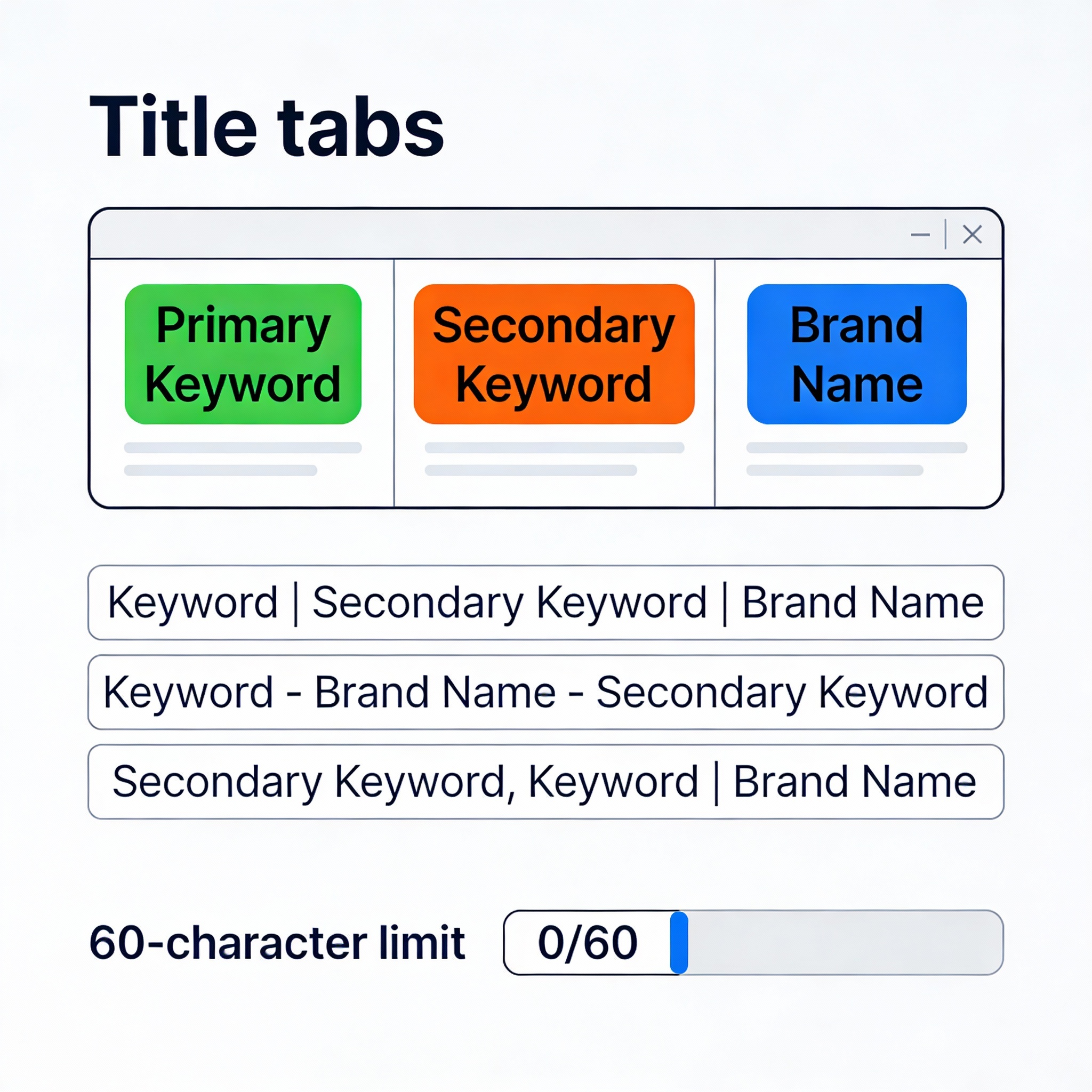
Title Tag Formula
A proven structure is: [Primary Keyword] | [Secondary Keyword/Benefit] | [Brand]
Examples:
-
"On-Page SEO Checklist for Modern Websites | Complete Guide | MyBrand"
-
"Best Keyword Research Tools for Agencies – 2025 Comparison | MyCorp"
-
"Technical SEO Basics for Non-Developers | SEO Guide | MyCompany"
Notice how each title:
-
Includes the primary keyword early
-
Adds a secondary keyword or benefit
-
Mentions the brand
-
Stays under 60 characters
-
Uses delimiters (|, -, –) to separate ideas
Avoid keyword stuffing. Repeating the same keyword multiple times signals spam and hurts CTR. Google is sophisticated enough to understand that "on-page SEO" and "on page optimization" and "optimizing pages for SEO" all describe the same topic, so use keyword variations naturally.
Title Tag Unique Across Your Site
Never use the same title tag on multiple pages. Each page should have a unique title that accurately reflects that specific page's content. Duplicate titles confuse search engines about which page to rank and dilute your ranking power across multiple URLs.
Meta Descriptions: Winning Clicks From the SERP
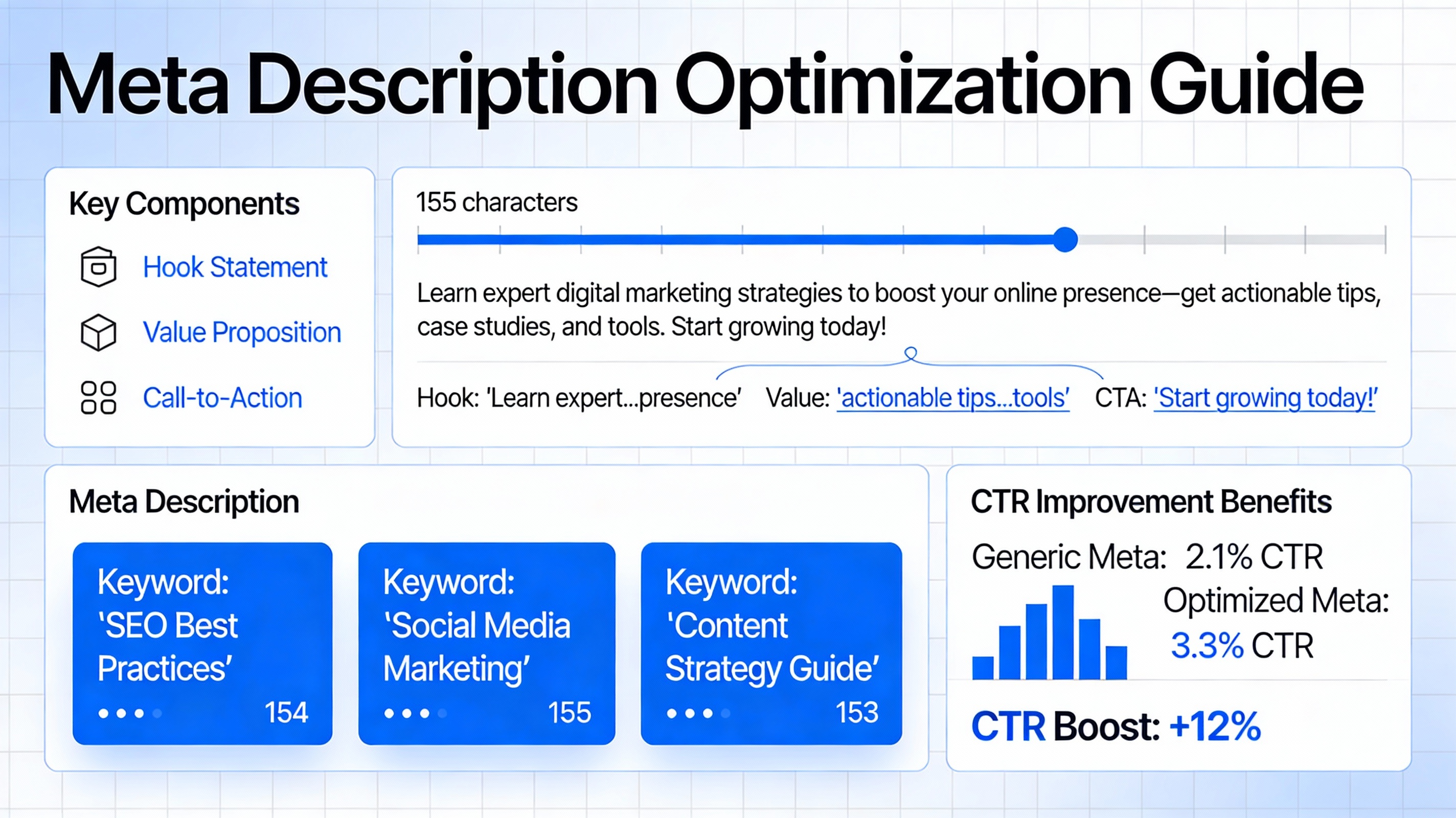
Keep meta descriptions between 150–160 characters on desktop (shorter on mobile, typically 120 characters). Write in active voice, answer the question implied by the search query, and include a call-to-action when appropriate.
Formula for meta descriptions:
[Hook/Value Statement] + [Specific Benefit/Answer] + [Call-to-Action]
Example:
"Learn the complete on-page SEO checklist to optimize title tags, meta descriptions, headers, and more. Step-by-step guide with actionable tactics. Read now."
Another example:
"Discover high-intent keywords that convert visitors into customers. Our proven process for finding and prioritizing keywords that drive revenue. Start today."
Make Meta Descriptions Unique
Like titles, each meta description should be unique to its page. Google sometimes rewrites meta descriptions based on the specific search query (showing different snippets for different keywords), but providing a well-written original description gives you the best chance of appearing exactly as intended.
Include Keywords Naturally
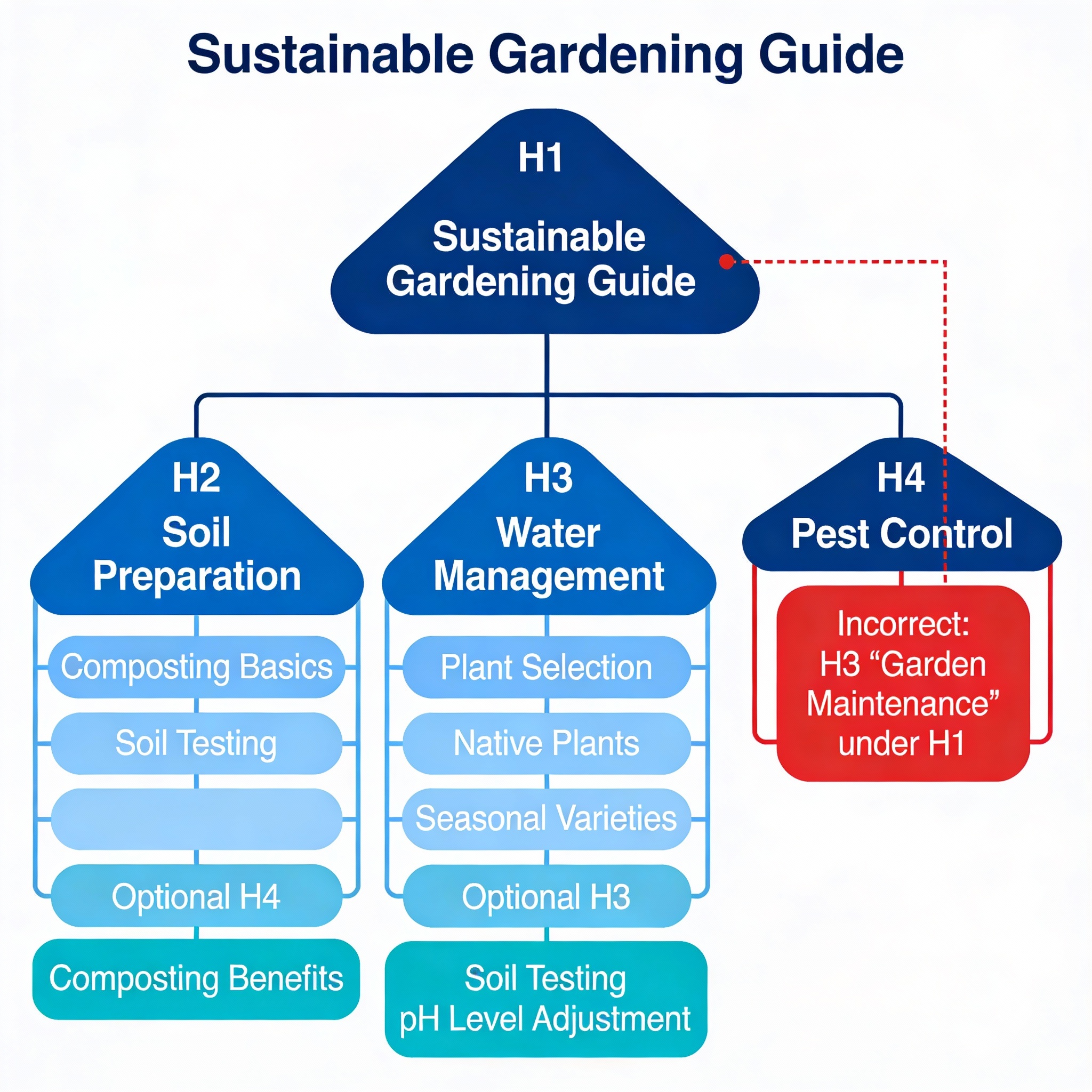
One H1 Per Page
Your H1 should be the main title of the page, roughly matching your target keyword. It should accurately summarize what the page is about. Use only one H1; using multiple H1s confuses search engines about your page's main topic.
H2s Support Your H1
H2 headers break your content into major sections. A typical page has 3–5 H2s. Each H2 should support and expand on your main topic. Use your secondary keywords and related terms naturally in H2s.
H3s Add Detail Under H2s
H3 headers provide sub-sections under H2s. They support specific points made in the H2 section. You can have multiple H3s under each H2.
H4 (Optional) for Deep Dives
H4 headers rarely appear in content but can organize extremely detailed sections. Most pages don't need H4s; they're typically used in technical documentation or very comprehensive guides.
Why Header Structure Matters
-
User experience: Readers scan headers to understand content structure before reading in detail.
-
Readability: Proper headers break up long walls of text.
-
SEO clarity: Headers signal to Google what each section is about.
-
Mobile optimization: Headers help mobile users navigate quickly.
-
Featured snippets: Google often pulls answers from sections organized with clear headers.
Content Optimization: Writing for Keywords and Users
Once you've optimized your title, description, and headers, your content itself must deliver on the promise those elements make.
Keyword Placement Where It Matters
Include your primary keyword:
-
In the first 100 words of your content (ideally first 25 words if possible)
-
In the H1 tag
-
In at least one H2 tag
-
Naturally throughout the content
Avoid keyword stuffing. Google is sophisticated enough to understand keyword variations and related terms. Natural, reader-friendly content ranks better than forced keyword repetition.
Aim for a keyword density of 0.5–1.5%—meaning your main keyword appears roughly 5–15 times in a 1,000-word article. More than that signals over-optimization.
Write Comprehensive Content That Answers User Intent
Your content must directly answer the question or fulfill the intent behind the keyword. If someone searches "best on-page SEO tools," they want a comparison of specific tools. A generic guide about "SEO best practices" won't satisfy that intent.
Review your target keyword in a search engine. What are the top-ranking pages doing? Your content should be at least as comprehensive, better organized, or offer a unique perspective that competitors don't provide.
Use Multimedia to Improve Engagement
-
Use short paragraphs (2–4 sentences)
-
Use bullet points and numbered lists
-
Bold key phrases (but don't overdo it)
-
Use white space generously
-
Write in clear, simple language
-
Vary sentence length
Readable content gets more engagement, which signals to Google that your page is valuable.
Image Optimization: Don't Forget Visual Assets
Alt text serves two purposes:
-
Accessibility: Screen readers read alt text to describe images for visually impaired users.
-
SEO: Google uses alt text to understand what an image shows.
Write descriptive alt text that would make sense if you read it aloud to someone who couldn't see the image. Include your keyword naturally if it fits, but don't force it.
Good alt text: "SEO expert conducting on-page optimization audit with keyword research data"
Bad alt text: "on-page SEO on-page SEO on-page SEO"
Image File Size and Format
Optimize images to be as small as possible without sacrificing quality. Use modern formats like WebP where supported. Large unoptimized images slow down your page, which hurts rankings and user experience.
URL Structure: Clean, Descriptive, Keyword-Rich
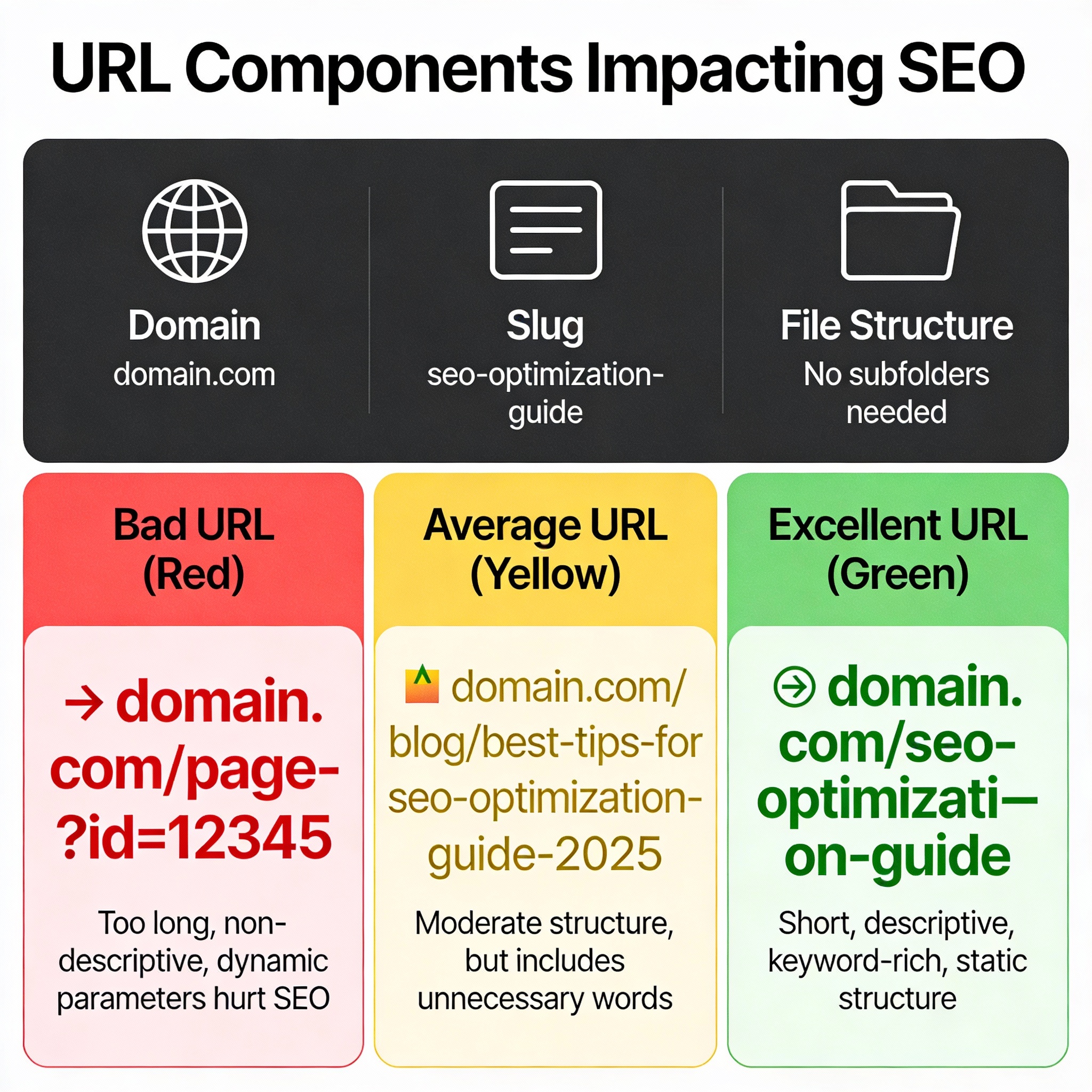
Keep URLs Short and Descriptive
Example: domain.com/on-page-seo-checklist
Instead of: domain.com/blog/article/page/12345/on-page-optimization-complete-guide-all-elements?version=2
Use Hyphens to Separate Words
Use hyphens, not underscores. Google treats hyphens as word separators but underscores as word connectors.
Include Your Target Keyword
When it makes sense, include your primary keyword in the URL. A URL like "domain.com/on-page-seo" sends a strong relevance signal for the keyword "on-page SEO."
Avoid Dynamic Parameters When Possible
URLs with numerous parameters (?id=123&version=2&sort=abc) are harder for users to read and for Google to crawl efficiently. If you must use parameters, keep them minimal.
Keep Your Site Architecture Logical
Deeply nested URLs (domain.com/blog/guides/seo/technical/on-page/checklist) are harder to crawl than shallow structures. Generally, 2–3 levels deep is optimal.
Internal Linking: Distribute Authority and Guide Users
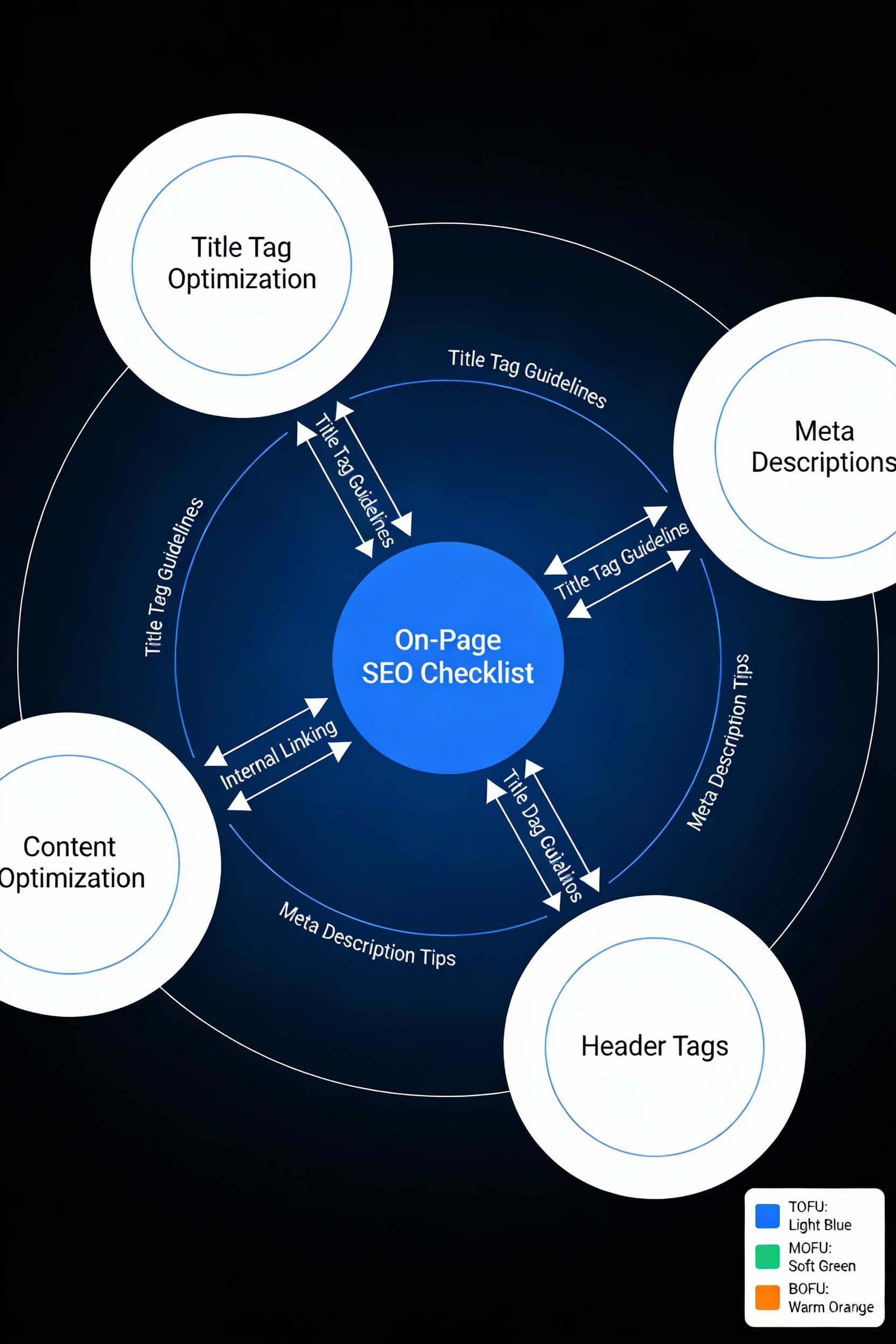
Internal linking serves two critical functions: it distributes page authority throughout your site and it guides both users and search engines through your content hierarchy.
Internal Linking Best Practices
Use Descriptive Anchor Text
Your anchor text (the visible text of a link) should clearly describe what the linked page is about. Instead of "click here," use "Learn about technical SEO optimization" or "Read our comprehensive on-page SEO guide."
Link from TOFU to MOFU to BOFU
If you're following a funnel strategy (as outlined in "Keyword Research That Actually Converts"), your internal linking should guide readers naturally through your funnel:
-
Beginner's guide (TOFU) links to comparison post (MOFU)
-
Comparison post links to service page (BOFU)
-
All pages link back to resources/hub pages
Create Topic Clusters
Link related content together. If you have articles on "title tag optimization," "meta description optimization," and "header tag optimization," they should all link to each other and to a central hub page like "On-Page SEO Checklist."
Avoid Over-Linking
Don't stuff your page with internal links. A few strategically placed, contextually relevant internal links are more powerful than dozens of forced links.
Schema Markup: Help Google Understand Your Content
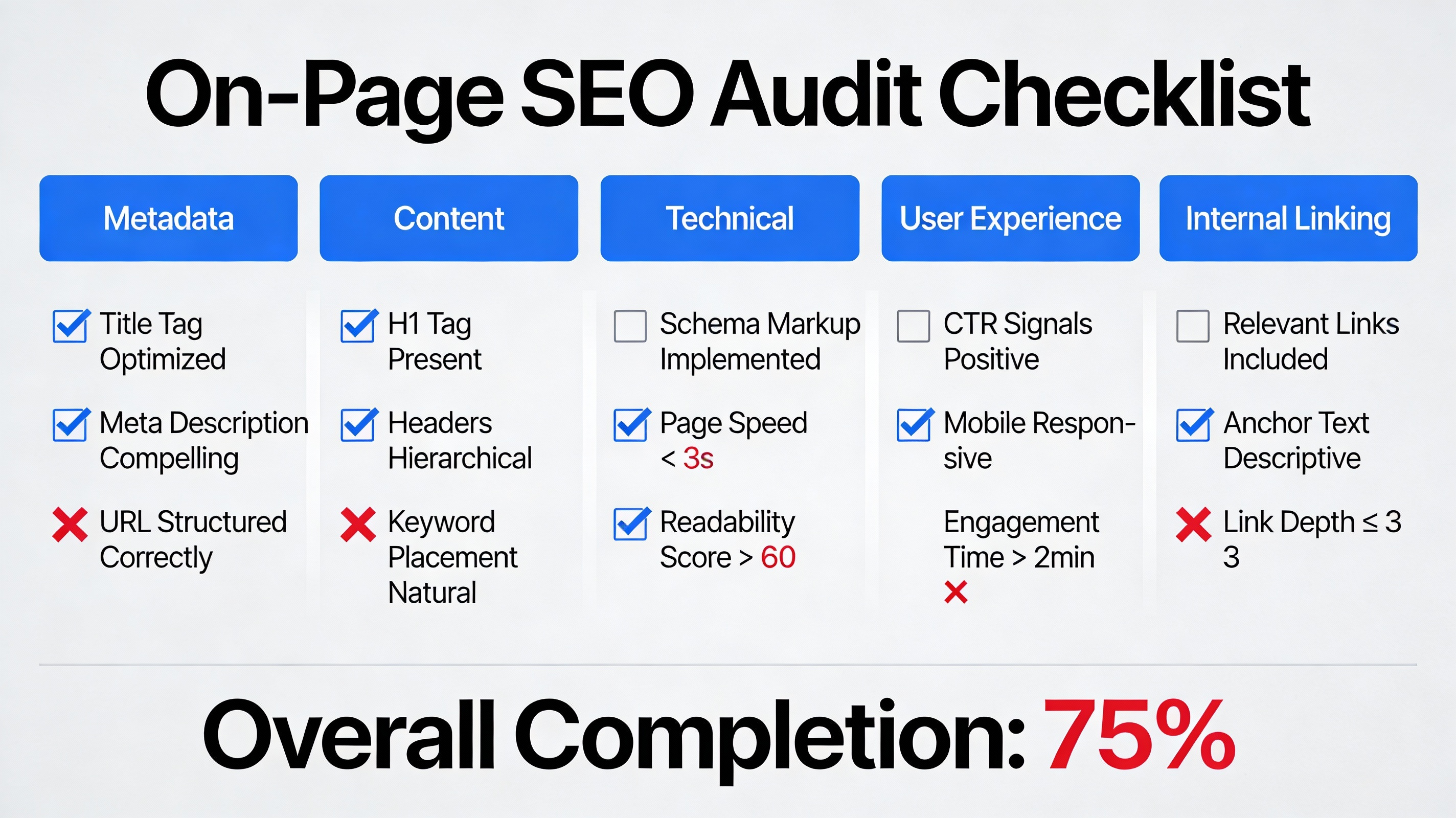
Article Schema
Use this for blog posts and articles. It tells Google your page is an article and provides metadata like author, publication date, and featured image.
FAQ Schema
If your page answers frequently asked questions, use FAQ schema. This often leads to your questions appearing as expandable accordions in search results, increasing real estate and CTR.
Product Schema
For e-commerce pages, product schema displays price, availability, ratings, and reviews in search results.
Breadcrumb Schema
Breadcrumb schema shows your site's hierarchy in search results, improving appearance and helping users understand site structure.
Implementing schema is often as simple as using a plugin (like Yoast SEO or Rank Math if you're on WordPress) or adding a few lines of JSON-LD code to your page template.
Avoiding On-Page SEO Pitfalls That Kill Rankings
To ensure your on-page optimization efforts succeed, avoid these common mistakes (covered in depth in our guide "SEO Mistakes That Kill Organic Growth"):
Keyword Stuffing
Over-using keywords makes content unreadable and triggers Google penalties. Write naturally; Google understands synonyms and variations.
Duplicate Content and Titles
Never use the same title or meta description on multiple pages. If you have similar content, use canonical tags to tell Google which version is primary.
Ignoring Mobile Optimization
Google uses mobile-first indexing, meaning it primarily indexes and ranks your mobile site. If your on-page elements (especially headers and CTAs) aren't optimized for mobile, you'll rank poorly.
Slow Page Speed
On-page optimization is undermined if your page takes 5+ seconds to load. Slow pages have worse user experience and lower rankings. This ties to "Technical SEO Basics for Non-Developers" which covers performance optimization.
Missing or Poor Alt Text
Images without alt text miss SEO opportunities and harm accessibility. Always include descriptive alt text.
The On-Page SEO Audit Workflow
To apply these principles systematically:
Step 1: Audit Your Current Pages
Use tools like SEMrush, Ahrefs, Moz, or the free Ubersuggest to analyze your pages against top-ranking competitors. These tools show gaps in your title length, meta description length, keyword optimization, and header structure.
Step 2: Prioritize High-Impact Pages
Focus first on pages that get traffic but have low CTR (your titles/descriptions can be improved) or pages targeting important keywords that you're close to ranking for.
Step 3: Implement Changes
Update titles, descriptions, headers, and anchor text systematically. Track changes in a spreadsheet.
Step 4: Monitor Results
After 2–4 weeks, check your CTR and rankings in Google Search Console. Did your changes improve performance?
Step 5: Iterate and Scale
Apply successful optimizations to other similar pages. Scale what works.
Connecting On-Page SEO to Your Broader SEO Strategy
This on-page checklist only works if it builds on solid keyword research (from "Keyword Research That Actually Converts") and a technically sound foundation ("Technical SEO Basics for Non-Developers"). Together:
-
Keyword research tells you what to optimize for.
-
On-page SEO makes sure each page is optimized for those keywords.
-
Technical SEO ensures your site's foundation supports those rankings.
-
"SEO Mistakes That Kill Organic Growth" helps you avoid common pitfalls.
-
"Measuring SEO Success Beyond Rankings" lets you track what actually works.
Interlink between these five guides so readers understand how they fit together and revisit relevant sections as needed.
Quick Takeaways
-
Title tags are your most important on-page element—they impact both rankings and CTR. Keep them 50–60 characters, include your primary keyword early, and make each one unique.
-
Meta descriptions don't directly impact rankings but powerfully impact CTR—keep them 150–160 characters, answer the user's intent, and include a call-to-action.
-
Headers organize content for humans and signal hierarchy to search engines—use one H1, support it with 3–5 H2s, use H3s for detail, and include keywords naturally.
-
Content must be comprehensive, answer user intent, and be readable—no keyword stuffing, use short paragraphs and lists, include multimedia.
-
Optimize images with descriptive filenames and alt text—this helps with Google Images rankings and accessibility.
-
URLs should be clean, descriptive, and keyword-rich—use hyphens, keep them short, avoid excessive parameters.
-
Internal linking distributes authority and guides users through your funnel—use descriptive anchor text and link naturally between related pages.
-
Schema markup helps Google understand your content—implement at least Article or FAQ schema on relevant pages.
-
Avoid common pitfalls like keyword stuffing, duplicate content, poor mobile optimization, and slow page speed—these actively harm rankings.
-
On-page SEO works best when paired with keyword research and technical foundation—use all five SEO guides together for maximum impact.
Conclusion
On-page SEO is the most controllable lever in your SEO toolkit. While you can't directly control backlinks or search algorithm updates, you have complete control over every element on your page. By systematically optimizing title tags, meta descriptions, headers, content, images, URLs, internal links, and schema, you create pages that are irresistibly relevant and useful to both search engines and human visitors.
The most common mistake is treating on-page SEO as a one-time task: write a blog post, add a keyword, move on. Instead, treat it as an ongoing practice. Successful SEO sites consistently audit and improve their on-page elements based on performance data. A title tag that gets improved CTR, an internal link that drives traffic to an important page, a header that's been clarified for better readability—these small optimizations compound into significant ranking and traffic improvements over months and years.
Start by conducting a comprehensive audit of your top 10–20 pages. Which have the lowest CTR despite ranking? Those are your quick wins for title and meta description improvements. Which pages are getting close to ranking but not quite breaking the first page? Those are your candidates for header and content improvements. Which pages get ranked traffic but don't convert? Those need internal linking improvements to push visitors toward your conversion goals.
Remember that on-page SEO is just one part of a complete SEO strategy. It only works when built on the keyword research foundation outlined in "Keyword Research That Actually Converts," protected by the technical soundness covered in "Technical SEO Basics for Non-Developers," guided by awareness of "SEO Mistakes That Kill Organic Growth," and measured by the frameworks in "Measuring SEO Success Beyond Rankings." Use all five guides together, interlink them, and you'll build a complete, scalable SEO system.
Your next step: Audit your 5 highest-traffic pages. For each, note: Is the title tag optimal? Is the meta description compelling? Are headers organized logically? Is the content answering user intent comprehensively? Pick one page to optimize completely, implement all changes, and measure the results in Google Search Console after 4 weeks. You'll likely see CTR improvements immediately, and ranking improvements within 2–3 months.
Frequently Asked Questions About On-Page SEO
Q1: How much do title tags and meta descriptions really matter for rankings?
A: Title tags are a ranking factor, though not the most important one. Meta descriptions don't directly impact rankings but dramatically impact CTR, which indirectly influences rankings through engagement signals. In other words: optimize them for click-through rate first, SEO second.
Q2: Does keyword density still matter?
A: Modern SEO has moved away from rigid keyword density targets. What matters is that your keyword appears enough times that the page is clearly about that topic, but not so many times that it reads unnaturally. Aim for 0.5–1.5%, but prioritize natural, readable content over hitting specific percentages.
Q3: How many internal links should I include on a page?
A: There's no magic number. Include enough internal links to guide users and distribute authority logically (typically 3–5 contextual internal links per 1,000 words), but avoid excessive linking that makes the page feel spammy.
Q4: Should I optimize images for every article?
A: Yes, whenever you include images. But images aren't required. A well-written text article without images ranks better than a poorly written article with lots of images. Quality content first, multimedia second.
Q5: How long should on-page SEO optimization take?
A: A new page should take 30–60 minutes of on-page optimization (title, description, headers, keyword placement, internal linking). Auditing and improving existing pages takes 15–30 minutes per page depending on how much revision is needed.
Q6: What if my CMS makes it hard to customize title tags or meta descriptions?
A: Most modern CMS platforms (WordPress, Shopify, HubSpot, etc.) have SEO plugins that make this easy. If your current platform doesn't, consider migrating or requesting the feature. This is a foundational SEO requirement.
Keep Reading: Complete Your SEO Strategy
This on-page optimization guide is strongest when paired with:
-
"Keyword Research That Actually Converts" – Identify what to optimize for.
-
"Technical SEO Basics for Non-Developers" – Ensure your technical foundation supports rankings.
-
"SEO Mistakes That Kill Organic Growth" – Avoid costly errors.
-
"Measuring SEO Success Beyond Rankings" – Track what actually drives revenue.
Read them in order, use them together, and interlink them on your site for maximum impact.
Search Engine Land. (2025). On-Page SEO in 2025: What You Need to Know. Retrieved from https://searchengineland.com/what-is-on-page-optimization-436921
SE Ranking. (2025). Meta Title and Description Tags in SEO: Best Practices. Retrieved from https://seranking.com/blog/title-tags-and-meta-descriptions-in-seo/
Loganix. (2024). 25 On-Page SEO Tips that WORK in 2025. Retrieved from https://loganix.com/on-page-seo-tips/
Backlinko. (2025). 10 Best Practices to Improve Your SEO Rankings in 2025. Retrieved from https://backlinko.com/hub/seo/best-practices
SearchAtlas. (2025). Meta Tag Optimization: What They Are & How to Use Them. Retrieved from https://searchatlas.com/blog/meta-tag-optimization/
AIOSEO. (2025). Content Optimization: Unlock Better Rankings. Retrieved from https://aioseo.com/content-optimization/
Semrush. (2024). On-Page SEO Checklist: The Complete Task List for 2025. Retrieved from https://www.semrush.com/blog/on-page-seo-checklist/
Moz. (2025). On-Page SEO: Master Your Website's Elements. Retrieved from https://moz.com/learn/seo/on-page-seo